Elegant Handwritten Font: Ningaloo for Web Design
As a web designer, I'm always on the lookout for fonts that can add a unique and elegant touch to my projects. Recently, I had the opportunity to test Ningaloo, a stylish and incredibly elegant handwritten font, in a real website layout. Let me share my experience and insights with you.
Visual Characteristics and Personality
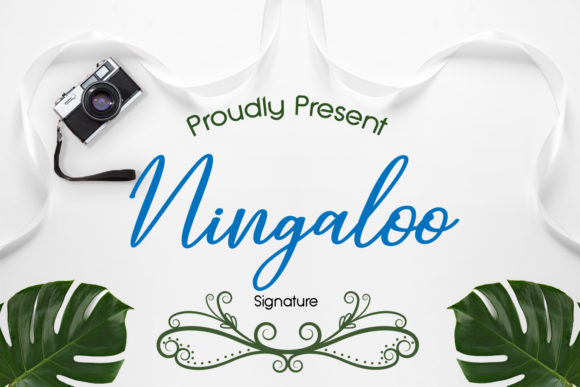
Ningaloo is a premium font that exudes elegance and charm. Its flowing, cursive style makes it perfect for adding a personal and sophisticated touch to any design. The font's personality is both modern and classic, making it versatile enough to fit a wide range of digital projects. The overall mood is one of refinement and creativity, which can elevate the visual appeal of a website.
Testing Ningaloo in Real Web Layouts
I decided to test Ningaloo in a creative portfolio website. The first thing I noticed was how well it performed in the hero section. The font's graceful curves and elegant lines made the headline stand out, creating a strong first impression. Here’s a breakdown of how Ningaloo fared in different parts of the website:
- Hero Section: The font's large, bold display in the hero section was captivating. It set the tone for the entire site and immediately drew the visitor's attention.
- Section Headings: In smaller headings, Ningaloo maintained its elegance without overpowering the content. It added a touch of sophistication to each section, making the page feel cohesive and well-designed.
- Call-to-Action (CTA) Buttons: Using Ningaloo for CTA buttons was a bit tricky. While it looked beautiful, I found that a simpler, more legible font like a clean sans serif worked better for these interactive elements.
- Image Overlays: Placing Ningaloo over images in banners and backgrounds created a visually stunning effect. The font's decorative nature complemented the imagery, enhancing the overall aesthetic.
Readability and User Engagement
One of the key considerations in web design is readability. Ningaloo performs exceptionally well in larger sizes, such as in headers and hero sections. However, for smaller text and body copy, it may not be the best choice. Here are some tips for using Ningaloo effectively:
- Mobile Screens: Test Ningaloo on mobile devices to ensure it remains readable. Adjust the font size and line height if necessary to maintain clarity.
- Responsive Layouts: Use Ningaloo for titles and headings, but switch to a clean, simple font for body text to ensure a smooth reading experience across all devices.
- Dark and Light Backgrounds: Ningaloo works well on both light and dark backgrounds, but make sure there is enough contrast for readability. A subtle shadow or outline can help if needed.
Font Pairing and Brand Consistency
To create a balanced and professional look, I paired Ningaloo with a clean sans serif font for the body text. This combination allowed the handwritten font to shine in key areas while maintaining overall readability. Here are some effective font pairing options:
- Sans Serif: Fonts like Roboto, Lato, or Montserrat provide a clean, modern look that complements the elegance of Ningaloo.
- Serif: For a more editorial and traditional feel, pair Ningaloo with a serif font like Merriweather or Georgia.
Maintaining brand consistency is crucial. Ningaloo can be a key element in establishing a unique and memorable brand identity. Use it consistently in headlines, logos, and other prominent areas to build recognition and trust.
Webfont Availability and Commercial Licensing
Before using Ningaloo in your web projects, make sure to check its webfont availability and commercial licensing. Most premium fonts, including Ningaloo, come with multiple styles, weights, and file formats. Ensure that you have the necessary permissions to use the font on websites, client projects, and digital assets.
In summary, Ningaloo is a fantastic choice for adding elegance and personality to your web designs. Its graceful, handwritten style makes it ideal for headers, hero sections, and image overlays. By pairing it with a clean, legible font for body text and ensuring proper readability, you can create a visually stunning and user-friendly website. Give Ningaloo a try and see how it elevates your next web project.